

How to Plan a Road Trip in 30 Minutes Using AI
From a blank map to a full scenic itinerary open in Google Maps — the exact 5-step workflow using TripsGalaxy.
Traditional road trip planning takes 4–8 hours: researching stops, checking driving distances, finding restaurants, mapping the route, building a day-by-day itinerary, and then doing it again when the first draft does not work. AI compresses all of this to 30 minutes. This guide walks through the exact process using TripsGalaxy — from entering your start and destination to having a full scenic itinerary with curated stops open in Google Maps. It also explains clearly what the AI does well and where human judgment still has to close the gap.
The 30-Minute Workflow
Five steps, 30 minutes total. Each step has a defined time budget — the workflow stays on schedule because each phase has a clear deliverable before moving to the next.
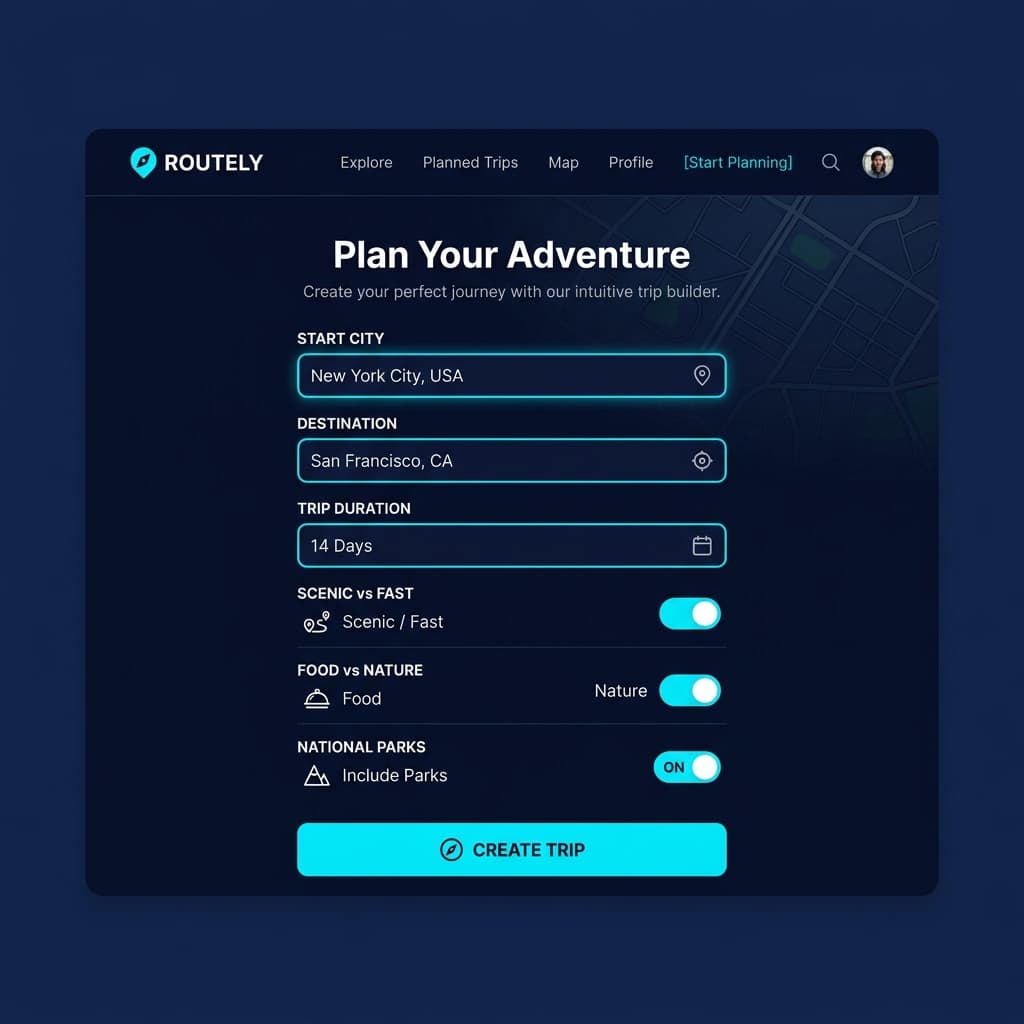
Enter origin, destination, and trip duration
Type your start city and destination. Select trip duration (number of days) and choose your priorities: scenic vs. fast route, food-heavy vs. nature-heavy, and whether you want national parks, state parks, or both included. These inputs shape every stop and timing decision downstream.
AI generates a scenic route with curated stops
The AI calculates a scenic route (not just the fastest route) and places stops every 2–3 hours — categorized as Eat, See, or Sleep. Stop selection is scored by POI density, elevation interest, and proximity to the route. This step produces a full multi-day itinerary skeleton with driving distances between every stop.
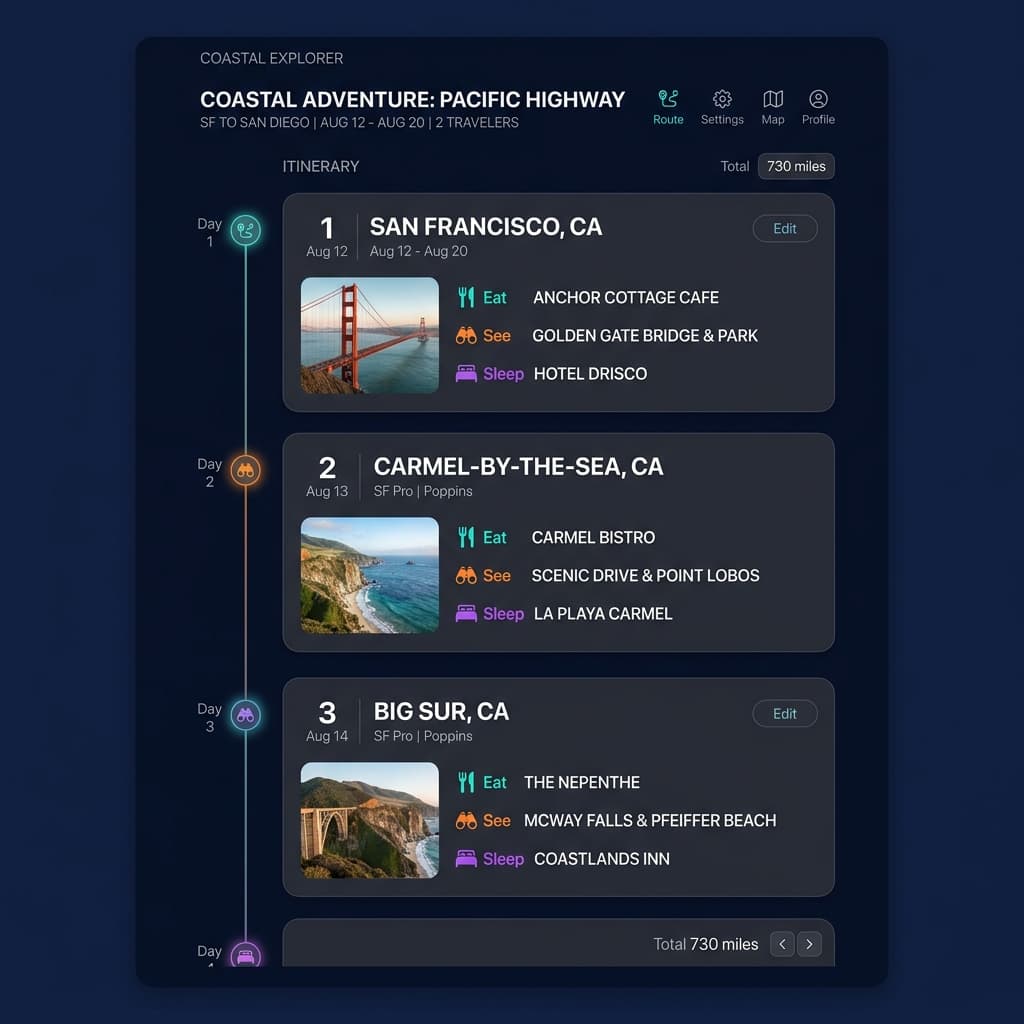
Review and customize — swap stops, adjust timing, add waypoints
Swap out any stop the AI selected with an alternative from the same region. Add personal waypoints (a friend's house, a specific trailhead, a restaurant you know). Adjust arrival times and overnight stay locations. The AI re-calculates driving times and distances after each change. This is where personal knowledge upgrades the AI skeleton.
Open the full route in Google Maps
Tap "Open in Maps" to generate a Google Maps deeplink with every waypoint from the itinerary pre-loaded in order. The link opens on any device — share it with travel partners, save it to your phone before departure, and navigate turn-by-turn from the first stop to the last.
Browse hotels and experiences at each stop
Each stop card surfaces nearby accommodation options and bookable experiences (tours, guided hikes, tastings). Options are affiliate-linked through booking partners — clicking through and booking at no additional cost to you supports TripsGalaxy. This is optional: skip it entirely if you are camping or have lodging already.
What AI Does Better Than Manual Planning
Four specific capabilities where AI road trip planning outperforms a human spending 4–8 hours on the same task.
Scenic route optimization
A standard navigation app optimizes for drive time. TripsGalaxy scores routes on elevation gain, POI density, and scenic byway designation — the same drive can be made through flat highway or through canyon roads with a 20-minute time difference. AI picks the canyon road.
Stop timing logic
Manual planners often under-estimate drive fatigue. The AI enforces a maximum of 3 hours between stops (adjustable), which means you arrive at every attraction with energy rather than already tired from a 5-hour drive. Stop pacing is one of the things planners consistently get wrong manually.
Discovery of stops you would never find manually
The first page of Google for any destination shows the same 10 attractions. AI route optimization surfaces local restaurants, unmarked viewpoints, and lesser-known trailheads that are geographically on your route but not in any top-10 list. The discovery layer is the most undercounted value in AI planning.
Google Maps deeplink with waypoints
Building a multi-stop Google Maps route manually requires entering each waypoint one at a time. TripsGalaxy generates the full Google Maps URL with every stop pre-loaded — a 10-stop itinerary becomes a single tap rather than 10 manual entries.
What AI Does NOT Replace
Three areas where human judgment still closes the gap — and where skipping this step will cost you on the trip.
Reservation booking
AI plans the route. Humans book Yosemite timed entry, campground reservations, and restaurant seatings. Recreation.gov reservations for peak-season national parks sell out months in advance — an AI-generated itinerary that includes Yosemite in July requires you to verify that timed entry is available before finalizing the route.
Weather checking
AI road trip planners do not predict weather. A 5-day route through the Rockies in October may encounter early snowfall that closes mountain passes. Weather.gov and Mountain-Forecast.com are the resources for route weather — check them 5–7 days before departure and have a plan-B for weather-sensitive segments.
Personal preference calibration
AI does not know you hate Mexican food, love waterfalls, or are traveling with a dog until you tell it. The preference inputs at the start of trip building capture broad categories; specific dislikes and highly personal preferences require human override during the review step. The best workflow: AI builds the skeleton, you spend 10 minutes refining it with knowledge the AI cannot have.
Best workflow: AI builds the route skeleton in 30 minutes. You spend 10 minutes refining it with reservation status, weather awareness, and personal preference knowledge the AI cannot have. Total planning time: under 45 minutes.
Common Questions
Can AI plan a road trip?+
How long does it take to plan a road trip with AI?+
Is TripsGalaxy free?+
Does AI replace Google Maps for road trip navigation?+
Continue Reading

How to Visit National Parks in Summer Without the Crowds (2026)
Timed entry systems, early arrival strategy, park-specific crowd avoidance tactics, and what to do when reservations are sold out.

Utah's Mighty 5 Road Trip: 7-Day National Parks Loop (2026 Guide)
The complete 7-day Utah Mighty 5 road trip — Zion, Bryce, Capitol Reef, Arches, and Canyonlands from Las Vegas with day-by-day stops and logistics.

Pacific Northwest Road Trip: Portland to Olympic Peninsula 5-Day Loop
A 5-day PNW loop — Columbia River Gorge, Mount Hood, Mount Rainier, Olympic rain forest, and the Washington coast from Portland.
Try it now — 30 minutes to a full scenic itinerary.
Enter your start and destination and have a complete scenic route with curated stops open in Google Maps in under 30 minutes. No account required.
Plan your road trip free